What are AI Agents in Easy Words
What is an AI agent?
An AI agent is a system that does not just talk. It acts. It is built around a language model, but instead of stopping at generating a response, it takes real steps to complete a task: calling tools, reading results, making decisions, and adjusting its plan as it goes.
In one sentence: an AI agent turns a language model from an advisor that gives suggestions into a worker that gets things done.
The intern analogy
Picture two interns at your company.
The first intern is brilliant but paralyzed. You ask them to book a flight, and they say, “Here is what I would do: go to the airline website, search for flights on Tuesday, pick the cheapest one, and enter your details.” They never touch the keyboard. That is a chatbot.
The second intern actually does it. They open the browser, search for flights, compare prices, pick the best option, book it, and come back with a confirmation number. If the flight is full, they try the next one. If the price jumped, they flag it and ask if you still want to proceed. That is an agent.
The whole magic is this: the model still does the thinking, but it also takes the action.
How AI agents work (step by step)
Here is what happens when you give an agent a task:
-
The task comes in. A user or system says something like, “Check yesterday’s transactions for fraud patterns and flag anything suspicious.”
-
The agent plans. The model breaks the task into steps: query the transaction database, apply fraud detection rules, compile findings, and write a report.
-
The agent acts. It calls the tools it has access to (a database query tool, a rule engine, a file writer) one at a time, reading each result before deciding the next step.
-
The agent observes and adjusts. If the database returns 10,000 rows, the agent narrows the query. If a rule fires on a transaction, the agent investigates further before flagging it. The loop continues until the task is genuinely complete.
-
The agent reports. Once done, the agent delivers the result: a report, a flagged list, a sent email, or an updated record. Every step is logged for audit.
The action loop
Every agent (no matter how complex) runs the same fundamental loop: perceive, decide, act, observe, adjust, repeat. What separates a toy demo from a production agent is not the loop itself, but what surrounds it: guardrails, memory, tool design, and evaluation.
📊 Process map: the agent action loop
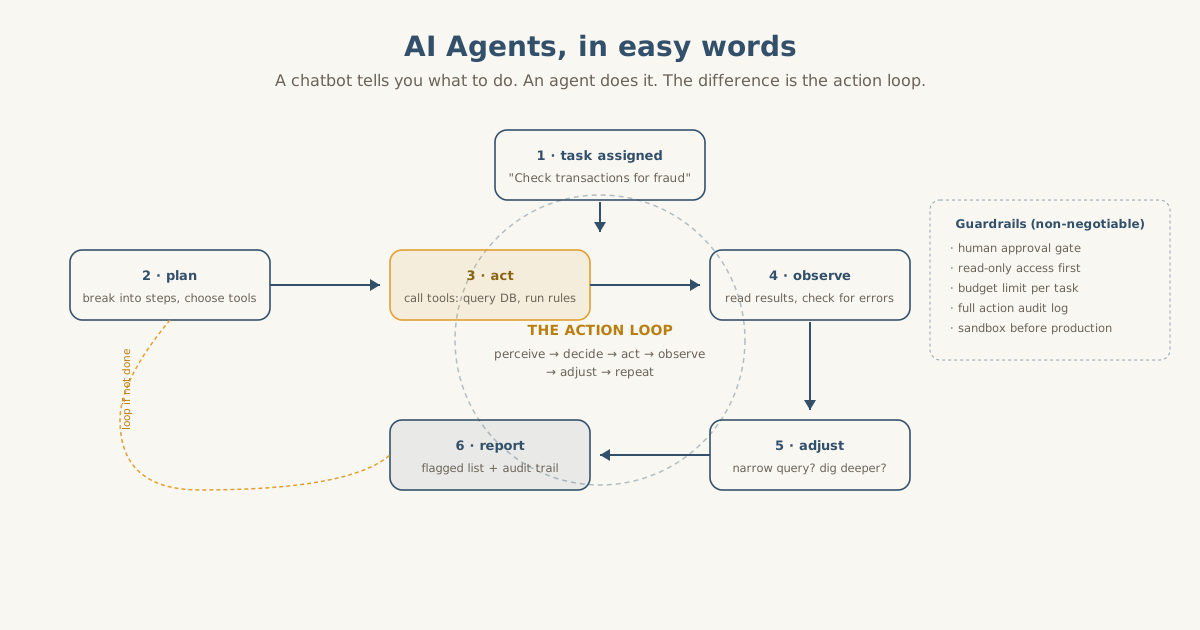
The loop runs until the task is complete. Guardrails (right) are not optional: they are what makes an agent safe to deploy.
Why AI agents matter for business
Most business processes are not single questions. They are multi-step workflows that require gathering information, making decisions, and taking action across multiple systems. A chatbot cannot handle that. An agent can.
I have seen this firsthand. At Cone Red, we build agent systems for banks, industrial operators, and pharmacy chains. The pattern is always the same: a team of smart people spending hours following checklists (compliance reviews, transaction monitoring, document processing) when an agent could handle the first 80% autonomously and escalate only the edge cases.
Here is what agents unlock:
- Process automation. Agents handle repetitive multi-step workflows (employee onboarding, compliance checks, invoice processing) without a human babysitting each step. We deployed this for a Ukrainian pharmacy chain with 100+ locations: the agent processes incoming operational documents, extracts the relevant data, and routes them for approval. What took a human 20 minutes per document now takes 90 seconds.
- Research and reporting. Agents gather data from multiple sources, cross-reference findings, and produce structured reports. What takes an analyst two days takes an agent twenty minutes.
- Monitoring and response. Agents watch systems around the clock, flag anomalies, and take first-line action: restarting a service, blocking a suspicious transaction, alerting a human. For the banking clients where we process $250M+ in transactions, this is not a nice-to-have. It is the difference between catching fraud in seconds versus days.
- Customer operations. Agents resolve support tickets end to end: reading the request, checking account history, applying policies, and issuing a response or refund.
The ROI is direct: tasks that required a human following a checklist are now completed by a system that never gets tired, never skips a step, and logs everything it does.
Chatbot vs agent vs multi-agent system
| Chatbot | Agent | Multi-agent system | |
|---|---|---|---|
| What it does | Answers questions | Completes tasks | Orchestrates complex workflows |
| Action | None (text only) | Calls tools, takes steps | Multiple agents, each with a role |
| Autonomy | Zero (responds to prompts) | Moderate (runs a task loop) | High (coordinates, delegates, reviews) |
| Best for | Q&A, support | Single-task automation | Complex processes with handoffs |
| Risk level | Low (wrong answer) | Medium (wrong action) | Higher (cascading effects) |
The practical rule: start with a single agent for one task. Add more agents only when the workflow genuinely requires specialization. Multi-agent systems are powerful, but they add coordination overhead and failure modes that single agents do not have.
Guardrails: the part everyone skips
An agent without guardrails is a liability. An agent with guardrails is a reliable worker. The difference is not the model. It is the architecture around it.
Non-negotiable guardrails for any production agent:
- Human approval gate. For any action that touches money, customer data, or production systems, the agent proposes, a human approves. No exceptions on day one.
- Read-only access first. The agent starts with permission to read everything and write nothing. Expand permissions only after the agent proves it makes good decisions.
- Budget limits. Set a hard cap on API calls, compute time, and cost per task. Prevents a confused agent from burning through your budget in an afternoon.
- Full audit log. Every tool call, every decision, every output is logged. If something goes wrong, you can trace exactly what happened and fix it.
These are not theoretical. They are the rules I enforce on every agent system we deploy at Cone Red. The teams that skip them are the ones who end up in the news for the wrong reasons.
When you are ready for production-grade agents
The agents described above work for bounded, well-defined tasks. But when you need agents that operate across multiple systems, coordinate with each other, and handle tasks where a mistake is expensive, you need more than a basic agent loop.
The next question becomes: how do agents discover and negotiate with each other? How does an agent in your CRM know it can hand off to an agent in your billing system? How do you prevent agents from conflicting when they touch the same data?
I wrote about this in detail. The concept is called the Internet of Agents: a protocol layer that lets independent agents find each other, declare their capabilities, and collaborate safely. If you want to see what production multi-agent architecture looks like when trust and coordination are hard requirements, read the IoA blueprint.
And if you are building an AI-first company and need agents that actually ship in production (not demos that look good in a pitch deck), that is the work I do.
Key takeaways
- An AI agent is a system that takes action, not just generates text. It calls tools, reads results, and adjusts its plan.
- The difference from a chatbot is the action loop: do something, check if it worked, decide what to do next.
- Start narrow. Give the agent one well-bounded task, prove it works, then expand.
- Deploy with guardrails: human approval gates, read-only access first, budget limits, audit logs.
- Multi-agent systems are powerful but add complexity: only go multi-agent when the workflow demands specialization.
- Agents are not the future. They are the present. The companies deploying them now will have a two-year head start by the time the rest catch up.
Common Questions
- What is an AI agent?
- An AI agent is a system built around a language model that can take real actions. Instead of only generating text, it can call tools, search databases, send emails, write files, and run code, then observe the results and decide what to do next. Think of it as a digital worker that can complete multi-step tasks on its own.
- How is an AI agent different from a chatbot?
- A chatbot answers questions with text. An AI agent takes actions in the real world. A chatbot can tell you how to draft an invoice. An agent can pull the data, fill the template, and send it for approval. The distinction is the action loop: the agent does something, checks if it worked, and adjusts.
- What can AI agents do for business?
- The highest-ROI agent use cases are process automation (agents that handle multi-step workflows like onboarding or compliance checks), research and reporting (agents that gather data from multiple sources and synthesize findings), and monitoring (agents that watch systems, flag anomalies, and take first-line response). Any repetitive multi-step task that currently requires a human following a checklist is an agent candidate.
- Can AI agents work together?
- Yes. Multi-agent systems assign specialized roles to different agents (one gathers data, another analyzes it, a third writes the report) and coordinate them through a shared task or message channel. This mirrors how human teams work. The benefit is modularity: each agent stays simple and focused, and the system as a whole handles complex workflows.
- Are AI agents safe to deploy in production?
- They are safe when deployed with guardrails: human approval gates for sensitive actions, read-only access until reliability is proven, budget limits to prevent runaway operations, and full audit logs of every action taken. Start the agent in a sandbox, review its actions for a few weeks, and expand permissions only as trust builds. Never give an agent write access to production systems on day one.
- How do I build an AI agent?
- You need four components: a language model for reasoning, a set of tools the agent can call (APIs, databases, file operations), a memory system so the agent retains context across steps, and an orchestration layer that manages the action loop. Most teams start with a framework like LangChain, CrewAI, or a direct API integration, then customize as their workflow gets more complex.